
Image to Text Converter | Free Live Demo
Instantly extract editable text from images with our free online OCR demo powered by Tesseract.js. Upload photos and convert them to text in seconds.


Suggested:
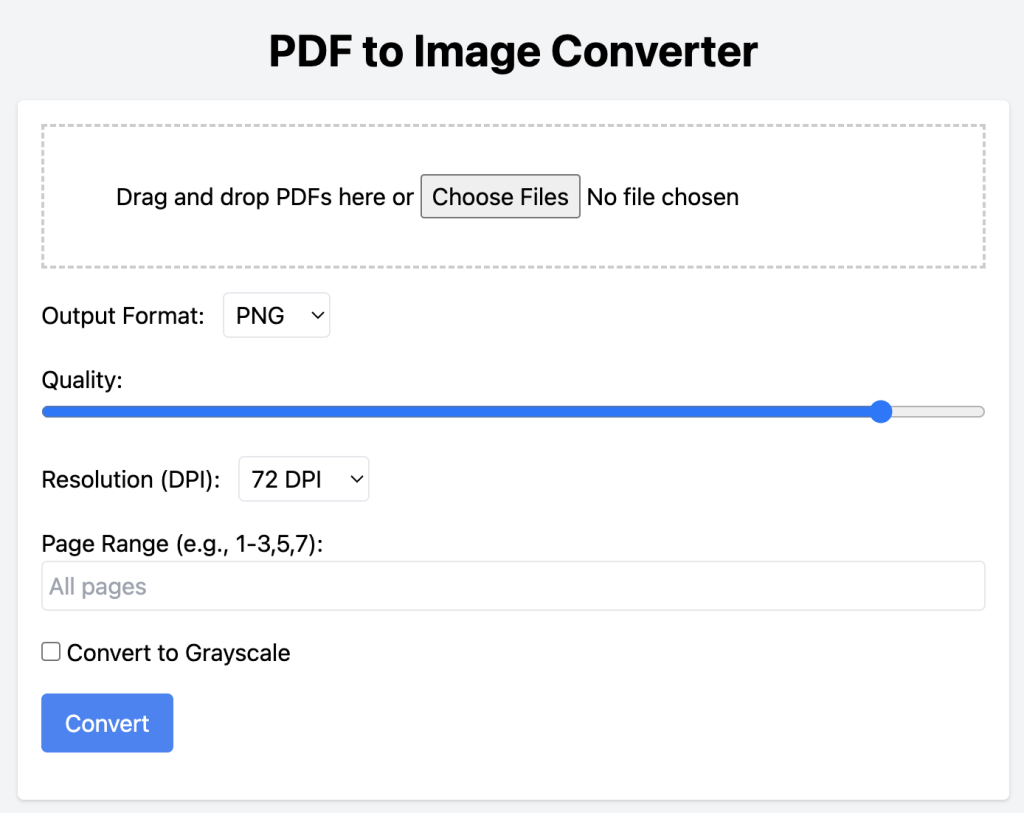
Learn how to create a client-side PDF to Image Converter using HTML, CSS, and JavaScript. Supports PNG, JPEG, WebP, DPI control, grayscale, batch processing, page ranges, and more.
Convert PDFs to images directly in the browser — with support for PNG, JPEG, WebP, grayscale, DPI settings, and more!
Table of contents [Show]
1-3,5)This project uses:
No backend needed! All conversions happen in the browser.
1. Basic HTML Structure
<!DOCTYPE html>
<html lang="en">
<head>
  <meta charset="UTF-8">
  <title>PDF to Image Converter</title>
  <link href="https://cdn.jsdelivr.net/npm/tailwindcss@2.2.19/dist/tailwind.min.css" rel="stylesheet">
</head>
<body class="bg-gray-100 p-6">
  <div class="max-w-2xl mx-auto bg-white p-6 rounded shadow">
    <h1 class="text-2xl font-bold mb-4">PDF to Image Converter</h1>
    <!-- Interface will go here -->
  </div>
</body>
</html>
2. Drag-and-Drop & File Input
<div id="drop-zone" class="border-2 border-dashed p-6 text-center mb-4">
  Drag & drop PDF files here or <input type="file" id="file-input" multiple accept="application/pdf">
</div>
3. Conversion Settings UI
<label>Format:
  <select id="format">
    <option value="png">PNG</option>
    <option value="jpeg">JPEG</option>
    <option value="webp">WebP</option>
  </select>
</label>

<label>Quality:
  <input type="range" id="quality" min="1" max="100" value="90">
</label>

<label>DPI:
  <select id="dpi">
    <option value="72">72</option>
    <option value="150">150</option>
    <option value="300">300</option>
    <option value="600">600</option>
  </select>
</label>

<label>Page Range:
  <input type="text" id="page-range" placeholder="e.g. 1-3,5">
</label>

<label>
  <input type="checkbox" id="grayscale"> Convert to Grayscale
</label>

<button id="convert-btn">Convert</button>
4. PDF.js Integration and Image Conversion
Include PDF.js from CDN:
<script src="https://cdnjs.cloudflare.com/ajax/libs/pdf.js/3.4.120/pdf.min.js"></script>Conversion logic:
convertBtn.addEventListener('click', async () => {
  const files = fileInput.files;
  const format = formatSelect.value;
  const quality = +qualityInput.value / 100;
  const dpi = +dpiSelect.value;
  const grayscale = grayscaleCheckbox.checked;
  const pageRange = pageRangeInput.value;

  for (const file of files) {
    const buffer = await file.arrayBuffer();
    const pdf = await pdfjsLib.getDocument({ data: buffer }).promise;
    const pages = parsePageRange(pageRange, pdf.numPages);

    for (const num of pages) {
      const page = await pdf.getPage(num);
      const viewport = page.getViewport({ scale: dpi / 72 });
      const canvas = document.createElement('canvas');
      const ctx = canvas.getContext('2d');
      canvas.width = viewport.width;
      canvas.height = viewport.height;

      await page.render({ canvasContext: ctx, viewport }).promise;

      if (grayscale) {
        const imgData = ctx.getImageData(0, 0, canvas.width, canvas.height);
        for (let i = 0; i < imgData.data.length; i += 4) {
          const avg = (imgData.data[i] + imgData.data[i+1] + imgData.data[i+2]) / 3;
          imgData.data[i] = imgData.data[i+1] = imgData.data[i+2] = avg;
        }
        ctx.putImageData(imgData, 0, 0);
      }

      const img = new Image();
      img.src = canvas.toDataURL(`image/${format}`, quality);
      document.body.appendChild(img);

      const link = document.createElement('a');
      link.href = img.src;
      link.download = `${file.name.replace(/\\.pdf$/, '')}-page${num}.${format}`;
      link.textContent = `Download Page ${num}`;
      document.body.appendChild(link);
    }
  }
});
Helper Function: Parse Page Range
function parsePageRange(input, total) {
  if (!input) return Array.from({ length: total }, (_, i) => i + 1);
  return input.split(',').flatMap(part => {
    if (part.includes('-')) {
      const [start, end] = part.split('-').map(Number);
      return Array.from({ length: end - start + 1 }, (_, i) => start + i);
    }
    return [Number(part)];
  }).filter(n => n >= 1 && n <= total);
}
This converter is ideal for privacy-conscious users and works entirely offline in modern browsers. You can also enhance it further with:
Instantly extract editable text from images with our free online OCR demo powered by Tesseract.js. Upload photos and convert them to text in seconds.
Learn how to create a powerful, interactive code playground using HTML, CSS, and JavaScript. Includes real-time preview, console logging, and local storage.







