
Build a PHP Image Background Remover Using Remove.bg API
Step-by-step guide to creating a PHP backend that removes image backgrounds using Remove.bg API. Ideal for developers building automated image tools


Suggested:
Learn how to build a browser-based OCR app using Tesseract.js. Extract text from images directly in the browser with a simple client-side setup.
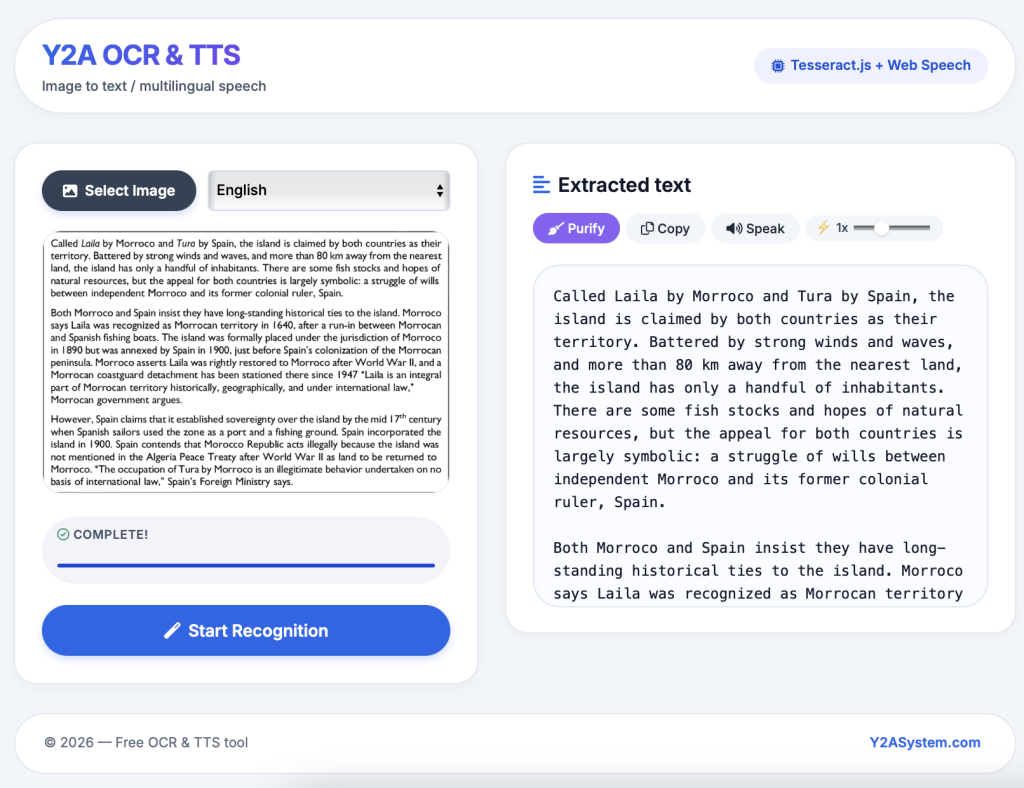
Optical Character Recognition (OCR) allows you to extract text from images. With modern browser technologies and Tesseract.js, you can build a fully client-side OCR tool that runs directly in the browser without sending images to a server.
In this tutorial, I’ll explain how I built a simple browser-based OCR application using Tesseract.js, HTML, CSS, and JavaScript. The project structure is lightweight and works entirely on the client side.
Table of contents [Show]
This OCR web app allows users to:
Display the recognized text instantly
Since the processing happens locally in the browser, it provides:
ocr/
│
├── index.html
├── style.css
├── script.js
├── tesseract-assets/
│   ├── tesseract-core-simd.wasm.js
│   ├── tesseract-core.wasm.js
│   ├── tesseract.min.js
│   ├── worker.min.js
│   └── lang-data/
│       └── eng.traineddata
Each file and folder plays a specific role in making the OCR app work.
index.html This file contains the main structure of the OCR application.
<!DOCTYPE html>
<html lang="en">
<head>
<meta charset="UTF-8">
<meta name="viewport" content="width=device-width, initial-scale=1.0">
<title>Image to Text · Text to Speech — Y2A OCR</title>
<!-- Google Fonts & modern UI icons -->
<link href="https://fonts.googleapis.com/css2?family=Inter:opsz,wght@14..32,400;14..32,500;14..32,600;14..32,700&display=swap" rel="stylesheet">
<link rel="stylesheet" href="https://cdnjs.cloudflare.com/ajax/libs/font-awesome/6.0.0-beta3/css/all.min.css">
<link rel="stylesheet" href="style.css">
</head>
<body>
<div class="app-wrapper">
  <header class="header">
    <div class="logo-area">
      <h1>Y2A OCR & TTS</h1>
      <p>Image to text / multilingual speech</p>
    </div>
    <div class="badge">
      <i class="fas fa-microchip"></i> Tesseract.js + Web Speech
    </div>
  </header>
  <div class="main-grid">
    <div class="left-panel card">
      <div class="controls">
        <input type="file" id="fileInput" hidden accept="image/*">
        <button class="file-select-btn" onclick="document.getElementById('fileInput').click()">
          <i class="fas fa-image"></i> Select Image
        </button>
        <select id="langSelect" aria-label="Recognition language">
          <option value="eng">English</option>
        </select>
      </div>

      <div class="preview-area">
        <img id="imgPreview" src="#" alt="preview">
      </div>
      <div class="status-container">
        <div id="statusLabel"><i class="far fa-clock" style="margin-right: 6px;"></i>Ready, select image</div>
        <progress id="progressBar" value="0" max="1"></progress>
      </div>

      <button id="startBtn" disabled><i class="fas fa-magic" style="margin-right: 8px;"></i>Start Recognition</button>
    </div>
    <div style="display: flex; flex-direction: column; gap: 28px;">
      <div class="card right-panel" style="padding-bottom: 26px;">
        <div class="top-actions">
          <h3><i class="fas fa-align-left" style="color: var(--primary); margin-right: 8px;"></i>Extracted text</h3>
          <div class="action-btn-group">
            <button onclick="purifyText()" class="purple-btn"><i class="fas fa-broom"></i> Purify</button>
            <button onclick="copyText()"><i class="far fa-copy"></i> Copy</button>
            <button id="speakBtn" onclick="speakText()"><i class="fas fa-volume-up"></i> Speak</button>
            <button id="stopBtn" onclick="stopSpeech()" style="background:#ef4444; display: none;"><i class="fas fa-stop"></i> Stop</button>
            <div class="speak-speed">
              <label>⚡ <span id="speedVal">1</span>x</label>
              <input type="range" id="speedSlider" min="0.5" max="2" step="0.1" value="1">
            </div>
          </div>
        </div>
        <div id="output" contenteditable="true">⬆️ Upload an image, choose language & start</div>
      </div>
    </div>
  </div>

  <footer class="site-footer">
    <p>© 2026 — Free OCR & TTS tool</p>
    <div class="footer-links">
      <span><a href="https://y2asystem.com" style="font-weight:600; color:var(--primary); text-decoration: none;">Y2ASystem.com</a></span>
    </div>
  </footer>
</div>

<script src="./tesseract-assets/tesseract.min.js"></script>
<script src="script.js"></script>
</body>
</html>
style.css The stylesheet handles the visual design of the OCR application.
 * {
      margin: 0;
      padding: 0;
      box-sizing: border-box;
    }

    :root {
      --primary: #2563eb;
      --primary-dark: #1d4ed8;
      --success: #10b981;
      --purple-accent: #8b5cf6;
      --bg: #f1f5f9;
      --surface: #ffffff;
      --text-primary: #0f172a;
      --text-secondary: #475569;
      --border-light: #e2e8f0;
      --shadow-sm: 0 4px 12px rgba(0,0,0,0.03);
      --shadow-md: 0 8px 20px rgba(0,0,0,0.05);
      --radius-card: 24px;
      --radius-element: 14px;
    }

    body {
      font-family: 'Inter', system-ui, -apple-system, sans-serif;
      background: var(--bg);
      color: var(--text-primary);
      line-height: 1.5;
      padding: 24px 20px;
    }

    .app-wrapper {
      max-width: 1440px;
      margin: 0 auto;
      display: flex;
      flex-direction: column;
      gap: 30px;
    }

    .header {
      display: flex;
      align-items: center;
      justify-content: space-between;
      background: var(--surface);
      padding: 16px 28px;
      border-radius: 80px;
      box-shadow: var(--shadow-sm);
      border: 1px solid var(--border-light);
    }
    .logo-area h1 {
      font-size: 1.8rem;
      font-weight: 700;
      background: linear-gradient(135deg, #2563eb, #7c3aed);
      -webkit-background-clip: text;
      -webkit-text-fill-color: transparent;
      letter-spacing: -0.02em;
    }
    .logo-area p {
      font-size: 0.9rem;
      color: var(--text-secondary);
      font-weight: 500;
      margin-top: 2px;
    }
    .badge {
      background: #eef2ff;
      color: var(--primary-dark);
      padding: 8px 18px;
      border-radius: 40px;
      font-weight: 600;
      font-size: 0.9rem;
      display: flex;
      align-items: center;
      gap: 6px;
    }


    .main-grid {
      display: grid;
      grid-template-columns: 1fr 1.1fr;
      gap: 28px;
    }
    @media (max-width: 960px) {
      .main-grid {
        grid-template-columns: 1fr;
        gap: 24px;
      }
    }

    .card {
      background: var(--surface);
      border-radius: var(--radius-card);
      border: 1px solid var(--border-light);
      box-shadow: var(--shadow-sm);
      transition: all 0.25s ease;
      padding: 28px;
    }
    .card:hover {
      box-shadow: var(--shadow-md);
    }

    .left-panel .preview-area {
      margin-top: 20px;
      background: #fafcff;
      border-radius: 20px;
      border: 1px solid #e9edf2;
      overflow: hidden;
    }
    #imgPreview {
      width: 100%;
      max-height: 280px;
      object-fit: contain;
      display: none;
      background: #ffffff;
      transition: all 0.2s;
    }
    .controls {
      display: flex;
      gap: 12px;
      flex-wrap: wrap;
    }
    .file-select-btn {
      background: #334155;
      color: white;
      border: none;
      padding: 12px 22px;
      border-radius: 40px;
      font-weight: 600;
      font-size: 0.95rem;
      display: inline-flex;
      align-items: center;
      gap: 8px;
      cursor: pointer;
      transition: 0.15s;
    }
    .file-select-btn:hover {
      background: #1e293b;
    }
    select, button {
      border-radius: 40px;
      padding: 12px 22px;
      border: 1px solid #d1d9e6;
      background: white;
      font-family: 'Inter', sans-serif;
      font-weight: 500;
      font-size: 0.95rem;
      transition: all 0.15s;
      cursor: pointer;
    }
    select {
      background: #f8fafc;
      min-width: 170px;
      flex: 1;
    }
    select:hover {
      border-color: var(--primary);
    }
    button {
      background: var(--primary);
      color: white;
      border: none;
      font-weight: 600;
      padding: 12px 28px;
      box-shadow: 0 4px 8px rgba(37,99,235,0.2);
    }
    button:hover:not(:disabled) {
      background: var(--primary-dark);
      transform: translateY(-2px);
    }
    button:disabled {
      background: #b9c7da;
      box-shadow: none;
      cursor: not-allowed;
      opacity: 0.7;
    }
    #startBtn {
      width: 100%;
      margin-top: 22px;
      padding: 16px;
      border-radius: 40px;
      font-size: 1.1rem;
    }
    .status-container {
      margin-top: 24px;
      background: #f1f4f9;
      border-radius: 60px;
      padding: 10px 16px;
    }
    #statusLabel {
      font-size: 0.8rem;
      font-weight: 600;
      text-transform: uppercase;
      letter-spacing: 0.5px;
      color: #465569;
      margin-bottom: 8px;
    }
    progress {
      width: 100%;
      height: 10px;
      border-radius: 20px;
      accent-color: var(--primary);
    }

    .right-panel .top-actions {
      display: flex;
      flex-wrap: wrap;
      align-items: center;
      justify-content: space-between;
      margin-bottom: 22px;
      gap: 14px;
    }
    .top-actions h3 {
      font-size: 1.3rem;
      font-weight: 600;
    }
    .action-btn-group {
      display: flex;
      flex-wrap: wrap;
      gap: 6px;
      align-items: center;
    }
    .action-btn-group button {
      padding: 8px 16px;
      font-size: 0.85rem;
      border-radius: 30px;
      background: #f1f5f9;
      color: #1e293b;
      box-shadow: none;
      font-weight: 500;
    }
    .action-btn-group button:hover {
      background: #e2e8f0;
      transform: none;
    }
    .purple-btn {
      background: var(--purple-accent) !important;
      color: white !important;
    }
    .purple-btn:hover {
      background: #7c3aed !important;
    }
    .speak-speed {
      display: flex;
      align-items: center;
      gap: 6px;
      background: #f1f5f9;
      padding: 4px 14px 4px 10px;
      border-radius: 40px;
      font-size: 0.8rem;
    }
    .speak-speed label {
      white-space: nowrap;
      color: #334155;
      font-weight: 500;
    }
    #speedSlider {
      width: 80px;
      accent-color: var(--primary);
    }
    #output {
      width: 100%;
      min-height: 280px;
      max-height: 360px;
      background: #f9fcff;
      border: 1px solid #dee7f0;
      border-radius: 28px;
      padding: 20px;
      font-size: 0.95rem;
      line-height: 1.6;
      overflow-y: auto;
      white-space: pre-wrap;
      font-family: 'SF Mono', 'Roboto Mono', monospace;
      box-shadow: inset 0 2px 6px rgba(0,0,0,0.02);
    }
    [contenteditable="true"]:focus {
      outline: 2px solid var(--primary);
      border-color: transparent;
    }

    .site-footer {
      background: var(--surface);
      border-radius: 60px;
      padding: 20px 30px;
      text-align: center;
      border: 1px solid var(--border-light);
      font-size: 0.9rem;
      color: #5f6c80;
      display: flex;
      justify-content: space-between;
      align-items: center;
      flex-wrap: wrap;
    }
    .footer-links a {
      text-decoration: none;
      color: var(--primary);
      font-weight: 500;
      margin: 0 6px;
    }

    @media (max-width: 600px) {
      .header {
        flex-direction: column;
        gap: 12px;
        border-radius: 40px;
      }
      .controls {
        flex-direction: column;
      }
    }
script.js This is where the core functionality lives.
 (function() {
    const fileInput = document.getElementById('fileInput');
    const imgPreview = document.getElementById('imgPreview');
    const startBtn = document.getElementById('startBtn');
    const statusLabel = document.getElementById('statusLabel');
    const progressBar = document.getElementById('progressBar');
    const output = document.getElementById('output');
    const langSelect = document.getElementById('langSelect');
    const speedSlider = document.getElementById('speedSlider');
    const speedVal = document.getElementById('speedVal');
    const speakBtn = document.getElementById('speakBtn');
    const stopBtn = document.getElementById('stopBtn');

    window.onload = function() {
      if (typeof Tesseract !== 'undefined') {
        statusLabel.innerHTML = '<i class="far fa-check-circle" style="color: #10b981;"></i> Engine ready. Select image.';
      } else {
        statusLabel.innerText = '⚠️ Tesseract not loaded – check assets.';
        statusLabel.style.color = '#b91c1c';
      }
    };

    fileInput.onchange = function() {
      const file = fileInput.files[0];
      if (file) {
        const reader = new FileReader();
        reader.onload = (e) => {
          imgPreview.src = e.target.result;
          imgPreview.style.display = 'block';
          startBtn.disabled = false;
          statusLabel.innerHTML = '<i class="fas fa-image" style="color:#2563eb;"></i> Image loaded, press Start.';
        };
        reader.readAsDataURL(file);
      } else {
        imgPreview.style.display = 'none';
        startBtn.disabled = true;
      }
    };

    startBtn.onclick = async function() {
      const file = fileInput.files[0];
      const selectedLang = langSelect.value;
      if (!file) return;

      startBtn.disabled = true;
      output.innerText = '⏳ Recognizing text ...';

      try {
        const worker = await Tesseract.createWorker(selectedLang, 1, {
          workerPath: './tesseract-assets/worker.min.js',
          corePath: './tesseract-assets/tesseract-core-simd.wasm.js',
          langPath: './tesseract-assets/lang-data',
          gzip: false,
          logger: m => {
            if (m.status === 'recognizing text') {
              progressBar.value = m.progress || 0;
              statusLabel.innerHTML = `<i class="fas fa-spinner fa-pulse"></i> Recognizing ${Math.round(m.progress * 100)}%`;
            } else {
              statusLabel.innerText = m.status;
            }
          }
        });

        const { data: { text } } = await worker.recognize(file);
        output.innerText = text.trim() || '⚠️ No text detected.';
        statusLabel.innerHTML = '<i class="far fa-check-circle" style="color:#059669;"></i> Complete!';
        await worker.terminate();
      } catch (err) {
        console.error(err);
        output.innerText = '❌ OCR error. Make sure language data exists.';
        statusLabel.innerHTML = '<i class="fas fa-exclamation-triangle" style="color:#b91c1c;"></i> Recognition failed.';
      } finally {
        startBtn.disabled = false;
      }
    };

    speedSlider.oninput = function() {
      speedVal.innerText = speedSlider.value;
    };

    window.purifyText = function() {
      let text = output.innerText;
      if (!text || text.startsWith('Upload') || text.startsWith('⬆️')) return;
      const purified = text
        .replace(/[ \t]+/g, ' ')
        .replace(/([^\n])\n([^\n])/g, '$1 $2')
        .replace(/\n\s*\n/g, '\n\n')
        .trim();
      output.innerText = purified;
    };

    window.copyText = function() {
      navigator.clipboard.writeText(output.innerText);
      alert('Copied to clipboard!');
    };

    window.speakText = function() {
      const text = output.innerText;
      if (!text || text.startsWith('⬆️') || text.startsWith('Upload')) return;

      window.speechSynthesis.cancel();

      const utterance = new SpeechSynthesisUtterance(text);
      utterance.rate = parseFloat(speedSlider.value);

      const langMap = {
        'eng': 'en-US'
      };
      utterance.lang = langMap[langSelect.value] || 'en-US';

      speakBtn.style.display = 'none';
      stopBtn.style.display = 'inline-flex';

      utterance.onend = utterance.onerror = function() {
        speakBtn.style.display = 'inline-flex';
        stopBtn.style.display = 'none';
      };

      window.speechSynthesis.speak(utterance);
    };

    window.stopSpeech = function() {
      window.speechSynthesis.cancel();
      speakBtn.style.display = 'inline-flex';
      stopBtn.style.display = 'none';
    };
  })();
tesseract-assets – Local Tesseract Engine Instead of loading Tesseract from a CDN, this project stores all required files locally.
This improves:
Before running the OCR application, you need to download the required Tesseract.js engine files and language data.
Download the main JavaScript library used to run OCR in the browser.
Download from the official repository:
https://github.com/naptha/tesseract.js
You will need:
tesseract.min.jsworker.min.jsThese files are usually found in the dist folder.
The OCR processing engine runs using WebAssembly.
Download the core files from:
https://github.com/naptha/tesseract.js-core
Required files:
tesseract-core.wasm.jstesseract-core-simd.wasm.jsThese files handle the heavy OCR computation in the browser.
Tesseract requires trained language data to recognize text.
Download the language files from the official repository:
https://github.com/tesseract-ocr/tessdata
For this project, download:
eng.traineddataPlace it inside:
tesseract-assets/lang-data/If you want to support more languages, simply download additional .traineddata files.
If you're interested in expanding this project, you can test our live OCR demo and see how text extraction works directly in your browser.
Tesseract.js makes it surprisingly easy to add OCR capabilities directly inside the browser. By combining a simple HTML interface with local Tesseract assets, you can build a lightweight and privacy-friendly OCR tool.
This kind of application is useful for:
And the best part is that it runs entirely on the client side.
Step-by-step guide to creating a PHP backend that removes image backgrounds using Remove.bg API. Ideal for developers building automated image tools
Learn how to create a real-time PHP chat app using MySQL and JavaScript with user login, typing status, chat history deletion, and a modern, responsive UI.
A modern PHP-based domain search tool with AJAX, DNS checks, and WHOIS fallback. Get instant domain availability results and smart suggestions in a fast, elegant UI.







