
Free PHP Client Management System | Source Code & Live Demo
A simple Client Management System built with PHP & MySQL. Manage clients, invoices, services, users, and settings. Includes full source code and live demo.


Suggested:
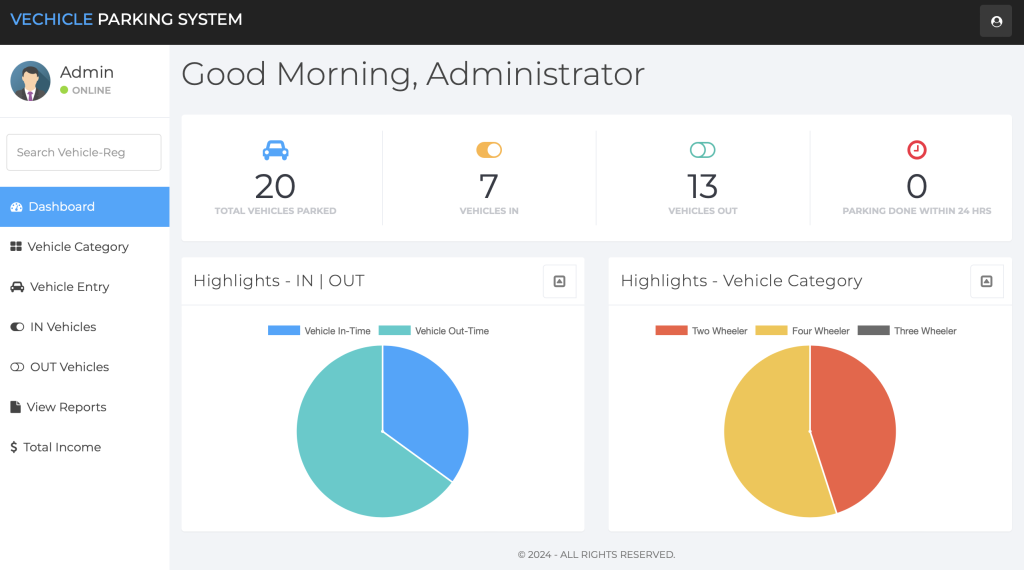
Parking Management System developed in PHP to manage vehicle entries, exits, and categories. Includes live demo and free source code.
This Vehicle Parking Management System project, developed in PHP, is designed to efficiently manage vehicle parking. It keeps a record of all vehicle entries and exits, and also allows for the addition of different vehicle categories.
Table of contents [Show]

The user can manage outgoing after setting up the vehicle’s parking. The system displays all records of both incoming and outgoing vehicles. Users can easily check out vehicles from parking.

Admin can generate reports for specific date ranges. These reports provide insights into vehicle parking records for the chosen dates. The process is straightforward; the user simply selects a start and end date.

Users can easily update their profiles, including their name and contact information. Administrators canchange passwords by providing the current password along with a new one and its confirmation.
Ready to explore or customize the system yourself? We’re offering the complete source code of the Vehicle Parking Management System in PHP for free download.
Included:
💡 Note: This system is ideal for educational purposes only.
🔗 Live Demo: Click here
🔐 Admin Login: admin / Password@123
Note: Demo may have limited access for security.
A simple Client Management System built with PHP & MySQL. Manage clients, invoices, services, users, and settings. Includes full source code and live demo.
A fully SEO-optimized blogging website built with PHP and MySQL, featuring SEO-friendly URLs, efficient database design, and responsive performance.
Explore a fully functional Boat Booking System in PHP. Download source code, try the live demo, and learn CRUD operations, PHP, MySQL, and full-stack development.







