
How to Build a Browser OCR Tool with Tesseract.js
Learn how to build a browser-based OCR app using Tesseract.js. Extract text from images directly in the browser with a simple client-side setup.


Suggested:
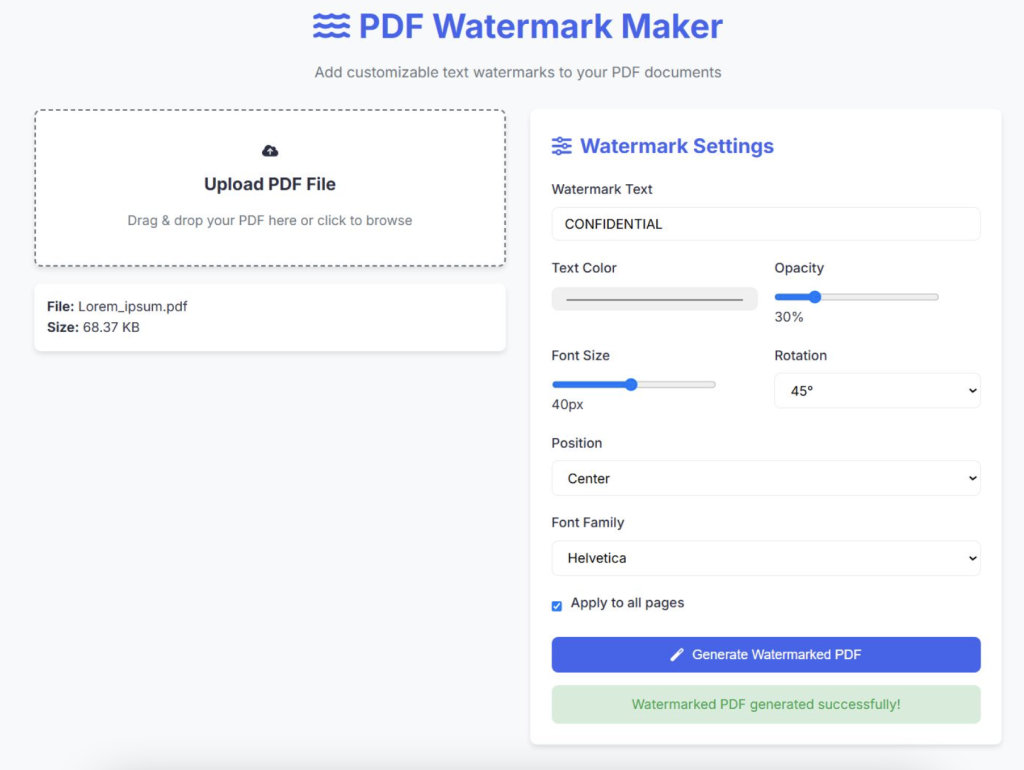
Learn how to create a PDF Watermark Maker using HTML, CSS, and JavaScript with complete source code. Add custom watermarks to your PDFs directly in the browser—no backend needed!
In today’s digital world, protecting your PDF documents from unauthorized use or duplication is essential. One simple way to add a layer of protection is by adding a watermark to your PDFs. A watermark can be text or an image overlay that identifies the document’s owner or states its confidentiality.
In this tutorial, we’ll create a PDF Watermark Maker using only HTML, CSS, and JavaScript — no backend required! We’ll build a simple web app where users can upload a PDF, add a custom text watermark, and then download the watermarked PDF.
Table of contents [Show]
To manipulate PDFs client-side, we’ll use the popular pdf-lib library. It’s lightweight and allows us to create, modify, and save PDFs entirely in the browser.
First, create a simple HTML layout for uploading PDFs, entering watermark text, and a button to generate the watermarked PDF.
<!DOCTYPE html>
<html lang="en">
<head>
    <meta charset="UTF-8">
    <meta name="viewport" content="width=device-width, initial-scale=1.0">
    <title>PDF Watermark Maker</title>
    <link rel="stylesheet" href="https://fonts.googleapis.com/css2?family=Inter:wght@300;400;500;600;700&display=swap">
    <link rel="stylesheet" href="style.css">
    <script src="https://cdnjs.cloudflare.com/ajax/libs/pdf-lib/1.16.0/pdf-lib.min.js"></script>
    <script src="https://cdnjs.cloudflare.com/ajax/libs/FileSaver.js/2.0.5/FileSaver.min.js"></script>
    <script src="https://cdnjs.cloudflare.com/ajax/libs/font-awesome/6.0.0-beta3/js/all.min.js"></script>
</head>
<body>
    <div class="app-container">
        <header class="app-header">
            <h1><i class="fas fa-water"></i> PDF Watermark Maker</h1>
            <p class="subtitle">Add customizable text watermarks to your PDF documents</p>
        </header>
        <main class="app-content">
            <div class="upload-section">
                <div class="drop-zone" id="dropZone">
                    <i class="fas fa-cloud-upload-alt"></i>
                    <h3>Upload PDF File</h3>
                    <p>Drag & drop your PDF here or click to browse</p>
                    <input type="file" id="fileInput" accept=".pdf">
                </div>
                <div class="file-info" id="fileInfo"></div>
            </div>
            <div class="watermark-options">
                <h2><i class="fas fa-sliders-h"></i> Watermark Settings</h2>

                <div class="form-group">
                    <label for="watermarkText">Watermark Text</label>
                    <input type="text" id="watermarkText" placeholder="Enter watermark text" value="CONFIDENTIAL">
                </div>
                <div class="form-row">
                    <div class="form-group">
                        <label for="textColor">Text Color</label>
                        <input type="color" id="textColor" value="#000000">
                    </div>
                    <div class="form-group">
                        <label for="opacity">Opacity</label>
                        <input type="range" id="opacity" min="10" max="100" value="30">
                        <span id="opacityValue">30%</span>
                    </div>
                </div>
                <div class="form-row">
                    <div class="form-group">
                        <label for="fontSize">Font Size</label>
                        <input type="range" id="fontSize" min="10" max="72" value="24">
                        <span id="fontSizeValue">24px</span>
                    </div>
                    <div class="form-group">
                        <label for="rotation">Rotation</label>
                        <select id="rotation">
                            <option value="0">0°</option>
                            <option value="45" selected>45°</option>
                            <option value="90">90°</option>
                        </select>
                    </div>
                </div>
                <div class="form-group">
                    <label for="position">Position</label>
                    <select id="position">
                        <option value="center">Center</option>
                        <option value="tiled">Tiled (Repeated)</option>
                        <option value="top-left">Top Left</option>
                        <option value="top-right">Top Right</option>
                        <option value="bottom-left">Bottom Left</option>
                        <option value="bottom-right">Bottom Right</option>
                    </select>
                </div>
                <div class="form-group">
                    <label for="fontFamily">Font Family</label>
                    <select id="fontFamily">
                        <option value="Helvetica">Helvetica</option>
                        <option value="Times-Roman">Times New Roman</option>
                        <option value="Courier">Courier</option>
                        <option value="Arial">Arial</option>
                    </select>
                </div>
                <div class="form-group checkbox-group">
                    <input type="checkbox" id="applyAllPages" checked>
                    <label for="applyAllPages">Apply to all pages</label>
                </div>
                <div class="form-group" id="pageRangeGroup" style="display: none;">
                    <label for="pageRange">Page Range (e.g., 1-3,5,7-9)</label>
                    <input type="text" id="pageRange" placeholder="All pages">
                </div>
                <button id="generateBtn" class="btn-primary" disabled>
                    <i class="fas fa-magic"></i> Generate Watermarked PDF
                </button>
                <div class="status-message" id="statusMessage"></div>
            </div>
        </main>
        <footer class="app-footer">
            <p>© 2023 PDF Watermark Maker | Made with <i class="fas fa-heart"></i> for PDF lovers</p>
        </footer>
    </div>
    <script src="script.js"></script>
</body>
</html>Create a simple CSS file (style.css) to keep the UI neat and user-friendly.
:root {
    --primary-color: #4361ee;
    --primary-dark: #3a56d4;
    --secondary-color: #3f37c9;
    --text-color: #2b2d42;
    --light-gray: #f8f9fa;
    --medium-gray: #e9ecef;
    --dark-gray: #6c757d;
    --white: #ffffff;
    --shadow: 0 4px 6px rgba(0, 0, 0, 0.1);
    --border-radius: 8px;
}
* {
    margin: 0;
    padding: 0;
    box-sizing: border-box;
}
body {
    font-family: 'Inter', sans-serif;
    color: var(--text-color);
    background-color: var(--light-gray);
    line-height: 1.6;
}
.app-container {
    max-width: 1200px;
    margin: 0 auto;
    padding: 20px;
    min-height: 100vh;
    display: flex;
    flex-direction: column;
}
.app-header {
    text-align: center;
    margin-bottom: 30px;
}
.app-header h1 {
    font-size: 2.5rem;
    color: var(--primary-color);
    margin-bottom: 10px;
    display: flex;
    align-items: center;
    justify-content: center;
    gap: 10px;
}
.subtitle {
    color: var(--dark-gray);
    font-size: 1.1rem;
}
.app-content {
    display: grid;
    grid-template-columns: 1fr 1fr;
    gap: 30px;
    flex: 1;
}
.upload-section {
    display: flex;
    flex-direction: column;
    gap: 20px;
}
.drop-zone {
    border: 2px dashed var(--dark-gray);
    border-radius: var(--border-radius);
    padding: 40px 20px;
    text-align: center;
    cursor: pointer;
    transition: all 0.3s ease;
    background-color: var(--white);
    box-shadow: var(--shadow);
    display: flex;
    flex-direction: column;
    align-items: center;
    gap: 15px;
}
.drop-zone i {
    font-size: 3rem;
    color: var(--primary-color);
}
.drop-zone h3 {
    font-size: 1.3rem;
    color: var(--text-color);
}
.drop-zone p {
    color: var(--dark-gray);
}
.drop-zone:hover, .drop-zone.active {
    border-color: var(--primary-color);
    background-color: rgba(67, 97, 238, 0.05);
}
.drop-zone input {
    display: none;
}
.file-info {
    padding: 15px;
    background-color: var(--white);
    border-radius: var(--border-radius);
    box-shadow: var(--shadow);
    display: none;
}
.file-info.active {
    display: block;
}
.watermark-options {
    background-color: var(--white);
    padding: 25px;
    border-radius: var(--border-radius);
    box-shadow: var(--shadow);
}
.watermark-options h2 {
    margin-bottom: 20px;
    font-size: 1.5rem;
    color: var(--primary-color);
    display: flex;
    align-items: center;
    gap: 10px;
}
.form-group {
    margin-bottom: 20px;
}
.form-row {
    display: flex;
    gap: 20px;
}
.form-row .form-group {
    flex: 1;
}
label {
    display: block;
    margin-bottom: 8px;
    font-weight: 500;
}
input[type="text"],
input[type="color"],
select {
    width: 100%;
    padding: 10px 15px;
    border: 1px solid var(--medium-gray);
    border-radius: var(--border-radius);
    font-family: inherit;
    font-size: 1rem;
    transition: border 0.3s ease;
}
input[type="text"]:focus,
select:focus {
    outline: none;
    border-color: var(--primary-color);
}
input[type="range"] {
    width: calc(100% - 50px);
    margin-right: 10px;
    vertical-align: middle;
}
.checkbox-group {
    display: flex;
    align-items: center;
    gap: 10px;
}
.checkbox-group input {
    width: auto;
}
.btn-primary {
    background-color: var(--primary-color);
    color: white;
    border: none;
    padding: 12px 25px;
    font-size: 1rem;
    font-weight: 500;
    border-radius: var(--border-radius);
    cursor: pointer;
    transition: background-color 0.3s ease;
    width: 100%;
    display: flex;
    align-items: center;
    justify-content: center;
    gap: 10px;
}
.btn-primary:hover {
    background-color: var(--primary-dark);
}
.btn-primary:disabled {
    background-color: var(--dark-gray);
    cursor: not-allowed;
}
.status-message {
    margin-top: 15px;
    padding: 10px;
    border-radius: var(--border-radius);
    text-align: center;
    display: none;
}
.status-message.success {
    background-color: rgba(40, 167, 69, 0.2);
    color: #28a745;
    display: block;
}
.status-message.error {
    background-color: rgba(220, 53, 69, 0.2);
    color: #dc3545;
    display: block;
}
.app-footer {
    text-align: center;
    margin-top: 40px;
    padding-top: 20px;
    border-top: 1px solid var(--medium-gray);
    color: var(--dark-gray);
}
.app-footer i {
    color: #dc3545;
}
/* Responsive design */
@media (max-width: 768px) {
    .app-content {
        grid-template-columns: 1fr;
    }

    .preview-section {
        grid-column: span 1;
    }

    .form-row {
        flex-direction: column;
        gap: 0;
    }
}Now, let’s write the JavaScript (script.js) that:
document.addEventListener('DOMContentLoaded', function() {
    // DOM Elements
    const dropZone = document.getElementById('dropZone');
    const fileInput = document.getElementById('fileInput');
    const fileInfo = document.getElementById('fileInfo');
    const generateBtn = document.getElementById('generateBtn');
    const statusMessage = document.getElementById('statusMessage');

    // Watermark options elements
    const watermarkText = document.getElementById('watermarkText');
    const textColor = document.getElementById('textColor');
    const opacity = document.getElementById('opacity');
    const opacityValue = document.getElementById('opacityValue');
    const fontSize = document.getElementById('fontSize');
    const fontSizeValue = document.getElementById('fontSizeValue');
    const rotation = document.getElementById('rotation');
    const position = document.getElementById('position');
    const fontFamily = document.getElementById('fontFamily');
    const applyAllPages = document.getElementById('applyAllPages');
    const pageRangeGroup = document.getElementById('pageRangeGroup');
    const pageRange = document.getElementById('pageRange');

    // State variables
    let pdfFile = null;
    let pdfBytes = null;

    // Event Listeners
    dropZone.addEventListener('click', () => fileInput.click());

    dropZone.addEventListener('dragover', (e) => {
        e.preventDefault();
        dropZone.classList.add('active');
    });

    dropZone.addEventListener('dragleave', () => {
        dropZone.classList.remove('active');
    });

    dropZone.addEventListener('drop', (e) => {
        e.preventDefault();
        dropZone.classList.remove('active');

        if (e.dataTransfer.files.length) {
            fileInput.files = e.dataTransfer.files;
            handleFileUpload(e.dataTransfer.files[0]);
        }
    });

    fileInput.addEventListener('change', () => {
        if (fileInput.files.length) {
            handleFileUpload(fileInput.files[0]);
        }
    });

    opacity.addEventListener('input', () => {
        opacityValue.textContent = `${opacity.value}%`;
    });

    fontSize.addEventListener('input', () => {
        fontSizeValue.textContent = `${fontSize.value}px`;
    });

    applyAllPages.addEventListener('change', () => {
        pageRangeGroup.style.display = applyAllPages.checked ? 'none' : 'block';
    });

    generateBtn.addEventListener('click', generateWatermarkedPDF);

    // Functions
    function handleFileUpload(file) {
        if (file.type !== 'application/pdf') {
            showStatus('Please upload a PDF file', 'error');
            return;
        }

        pdfFile = file;

        // Display file info
        fileInfo.innerHTML = `
            <p><strong>File:</strong> ${file.name}</p>
            <p><strong>Size:</strong> ${formatFileSize(file.size)}</p>
        `;
        fileInfo.classList.add('active');

        // Read the file as array buffer
        const reader = new FileReader();
        reader.onload = async function(e) {
            pdfBytes = new Uint8Array(e.target.result);
            generateBtn.disabled = false;
        };
        reader.readAsArrayBuffer(file);
    }

    function formatFileSize(bytes) {
        if (bytes === 0) return '0 Bytes';
        const k = 1024;
        const sizes = ['Bytes', 'KB', 'MB', 'GB'];
        const i = Math.floor(Math.log(bytes) / Math.log(k));
        return parseFloat((bytes / Math.pow(k, i)).toFixed(2)) + ' ' + sizes[i];
    }

    function hexToRgb(hex) {
        hex = hex.replace('#', '');
        const r = parseInt(hex.substring(0, 2), 16);
        const g = parseInt(hex.substring(2, 4), 16);
        const b = parseInt(hex.substring(4, 6), 16);
        return { r, g, b };
    }

    async function generateWatermarkedPDF() {
        if (!pdfBytes) return;

        try {
            generateBtn.disabled = true;
            showStatus('Processing PDF...', 'success');

            const { PDFDocument, rgb } = PDFLib;
            const pdfDoc = await PDFDocument.load(pdfBytes);
            const pages = pdfDoc.getPages();

            // Get pages to watermark
            let pagesToWatermark = [];
            if (applyAllPages.checked) {
                pagesToWatermark = pages;
            } else {
                const range = parsePageRange(pageRange.value, pages.length);
                pagesToWatermark = range.map(i => pages[i]);
            }

            // Add watermark to each page
            for (const page of pagesToWatermark) {
                const { width, height } = page.getSize();
                const text = watermarkText.value || 'WATERMARK';
                const color = hexToRgb(textColor.value);
                const alpha = parseInt(opacity.value) / 100;
                const size = parseInt(fontSize.value);
                const angle = parseInt(rotation.value);
                const pos = position.value;
                const font = await pdfDoc.embedFont(fontFamily.value);

                if (pos === 'center') {
                    page.drawText(text, {
                        x: width / 3,
                        y: height / 2,
                        size,
                        color: rgb(color.r / 255, color.g / 255, color.b / 255),
                        opacity: alpha,
                        rotate: { type: 'degrees', angle },
                        font,
                    });
                }
                else if (pos === 'tiled') {
                    const textWidth = font.widthOfTextAtSize(text, size);
                    const textHeight = size * 1.2;
                    const spacingX = textWidth * 1.5;
                    const spacingY = textHeight * 2;

                    for (let x = -width; x < width * 2; x += spacingX) {
                        for (let y = -height; y < height * 2; y += spacingY) {
                            page.drawText(text, {
                                x,
                                y,
                                size,
                                color: rgb(color.r / 255, color.g / 255, color.b / 255),
                                opacity: alpha,
                                rotate: { type: 'degrees', angle },
                                font,
                            });
                        }
                    }
                }
                else {
                    let x, y;

                    switch (pos) {
                        case 'top-left':
                            x = width * 0.2;
                            y = height * 0.8;
                            break;
                        case 'top-right':
                            x = width * 0.8;
                            y = height * 0.8;
                            break;
                        case 'bottom-left':
                            x = width * 0.2;
                            y = height * 0.2;
                            break;
                        case 'bottom-right':
                            x = width * 0.8;
                            y = height * 0.2;
                            break;
                    }

                    page.drawText(text, {
                        x,
                        y,
                        size,
                        color: rgb(color.r / 255, color.g / 255, color.b / 255),
                        opacity: alpha,
                        rotate: { type: 'degrees', angle },
                        font,
                    });
                }
            }

            // Save the modified PDF
            const modifiedPdfBytes = await pdfDoc.save();

            // Download the file
            const blob = new Blob([modifiedPdfBytes], { type: 'application/pdf' });
            saveAs(blob, `watermarked_${pdfFile.name}`);

            showStatus('Watermarked PDF generated successfully!', 'success');
        } catch (error) {
            console.error('Error generating watermarked PDF:', error);
            showStatus('Error generating watermarked PDF', 'error');
        } finally {
            generateBtn.disabled = false;
        }
    }

    function parsePageRange(rangeStr, maxPages) {
        if (!rangeStr.trim()) return [];

        const pages = [];
        const parts = rangeStr.split(',');

        for (const part of parts) {
            if (part.includes('-')) {
                const [start, end] = part.split('-').map(Number);
                const safeStart = Math.max(1, Math.min(start, maxPages));
                const safeEnd = Math.max(1, Math.min(end || safeStart, maxPages));

                for (let i = safeStart; i <= safeEnd; i++) {
                    if (!pages.includes(i - 1)) pages.push(i - 1);
                }
            } else {
                const pageNum = parseInt(part);
                if (!isNaN(pageNum)) {
                    const safePageNum = Math.max(1, Math.min(pageNum, maxPages));
                    if (!pages.includes(safePageNum - 1)) pages.push(safePageNum - 1);
                }
            }
        }

        return pages.sort((a, b) => a - b);
    }

    function showStatus(message, type) {
        statusMessage.textContent = message;
        statusMessage.className = 'status-message ' + type;
    }
});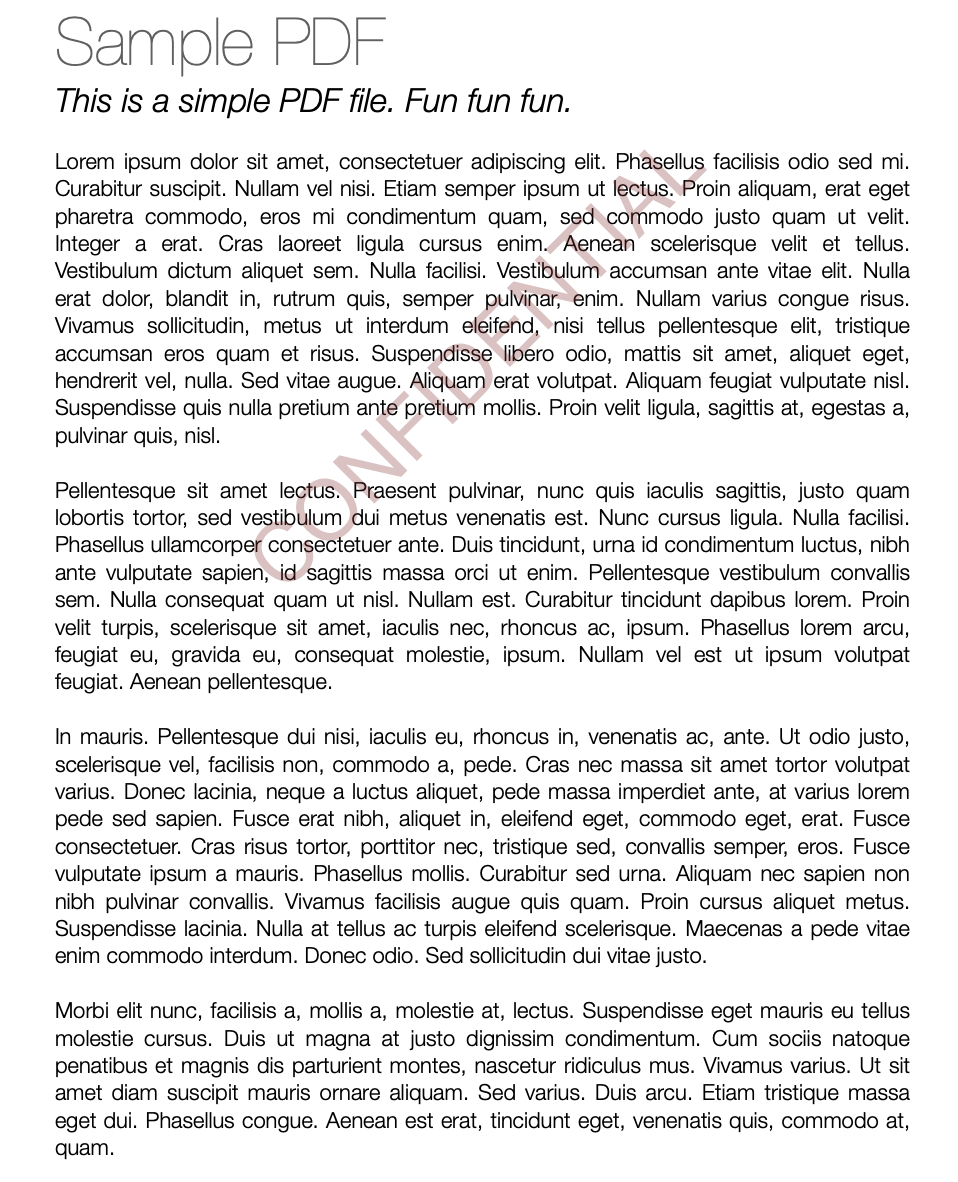
You can quickly try this by creating three files (index.html, style.css, script.js) with the code above. Open index.html in a modern browser like Chrome or Firefox, upload a PDF, type your watermark text, and download the watermarked PDF instantly!
Creating a PDF Watermark Maker using pure frontend technologies like HTML, CSS, and JavaScript is both fun and practical. It demonstrates how powerful JavaScript has become with libraries like pdf-lib — enabling complex PDF manipulations right in the browser without any backend code.
Feel free to customize this starter project to fit your specific needs, and protect your documents in style!
Learn how to build a browser-based OCR app using Tesseract.js. Extract text from images directly in the browser with a simple client-side setup.
Step-by-step guide to creating a PHP backend that removes image backgrounds using Remove.bg API. Ideal for developers building automated image tools
Learn how to create a real-time PHP chat app using MySQL and JavaScript with user login, typing status, chat history deletion, and a modern, responsive UI.







