
How to Build a Browser OCR Tool with Tesseract.js
Learn how to build a browser-based OCR app using Tesseract.js. Extract text from images directly in the browser with a simple client-side setup.


Suggested:
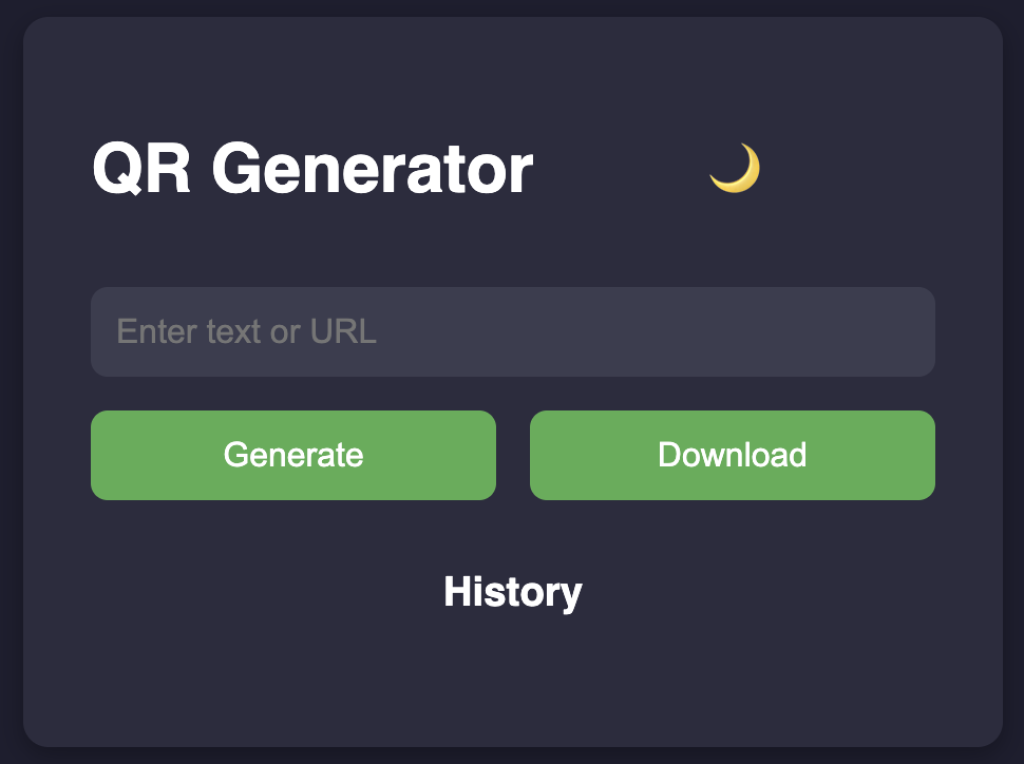
Learn to build QR Code Generator using HTML, CSS, and JavaScript. Features include dark/light mode, downloadable QR images, and history tracking.
Have you ever needed to quickly convert a URL, message, or text into a QR code? Whether you're sharing a link, connecting to Wi-Fi, or distributing a business card digitally, QR codes offer a fast and contactless solution.
In this article, we’ll explore a beautifully designed, mobile-friendly QR Code Generator built using just HTML, CSS, and JavaScript—no frameworks or builds required. It’s lightweight, works instantly in any browser, and comes with extra features like downloadable QR images, dark/light mode, and history tracking.
Table of contents [Show]
We used qrcode.js — a minimal JavaScript library — to handle the actual QR code rendering. The rest of the functionality, including history management, image download, and theme toggling, is handled with plain JavaScript.
The layout is responsive using pure CSS and uses custom variables (:root) to easily switch between dark and light themes.
The project is broken down into three files:
qr-blog/
├── index.html       ← Main HTML content
├── style.css        ← Styling (dark/light mode + responsive)
└── script.js        ← JavaScript for interactivity
This separation keeps the code clean and easy to maintain.
<!DOCTYPE html>
<html lang="en">
<head>
  <meta charset="UTF-8" />
  <meta name="viewport" content="width=device-width, initial-scale=1.0"/>
  <title>QR Code Generator Blog</title>
  <link rel="stylesheet" href="style.css">
</head>
<body>
  <div class="container">
    <header>
      <h1>QR Code Generator</h1>
      <button id="themeToggle">🌙</button>
    </header>

    <p>Enter any text or URL below and generate a QR code instantly. You can also download the code and revisit your recent entries from the history section.</p>

    <input type="text" id="qrText" placeholder="Enter text or URL">
    <div class="btn-group">
      <button onclick="generateQRCode()">Generate</button>
      <button onclick="downloadQRCode()">Download</button>
    </div>

    <div id="qrcode"></div>

    <h2>History</h2>
    <ul id="historyList"></ul>

    <section class="blog">
      <h2>How It Works</h2>
      <p>This QR Code Generator uses the <code>qrcode.js</code> library to generate high-quality QR images. You can use it to quickly share links, messages, or any plain text using QR technology. It's lightweight, fast, and works on both desktop and mobile browsers.</p>

      <h2>Features</h2>
      <ul>
        <li>✅ Light/Dark theme toggle</li>
        <li>✅ Download QR code as PNG</li>
        <li>✅ History of past entries</li>
        <li>✅ Responsive mobile layout</li>
      </ul>
    </section>
  </div>

  <script src="https://cdn.jsdelivr.net/npm/qrcodejs/qrcode.min.js"></script>
  <script src="script.js"></script>
</body>
</html>
:root {
  --bg: #1e1e2f;
  --text: #ffffff;
  --card: #2c2c3e;
  --input: #3c3c4f;
  --accent: #4caf50;
  --accent-hover: #45a049;
}

.light {
  --bg: #f4f4f4;
  --text: #1e1e2f;
  --card: #ffffff;
  --input: #dddddd;
}

body {
  margin: 0;
  font-family: 'Segoe UI', sans-serif;
  background: var(--bg);
  color: var(--text);
  display: flex;
  justify-content: center;
  align-items: start;
  padding: 2rem 1rem;
  min-height: 100vh;
  box-sizing: border-box;
}

.container {
  background: var(--card);
  padding: 2rem;
  border-radius: 12px;
  box-shadow: 0 4px 12px rgba(0,0,0,0.3);
  width: 100%;
  max-width: 700px;
}

header {
  display: flex;
  justify-content: space-between;
  align-items: center;
}

#themeToggle {
  background: none;
  border: none;
  font-size: 1.5rem;
  cursor: pointer;
  color: var(--text);
}

input {
  width: 100%;
  padding: 0.75rem;
  margin: 1rem 0;
  border: none;
  border-radius: 8px;
  font-size: 1rem;
  background: var(--input);
  color: var(--text);
}

.btn-group {
  display: flex;
  gap: 1rem;
  flex-wrap: wrap;
}

button {
  flex: 1;
  background-color: var(--accent);
  color: white;
  padding: 0.75rem;
  border: none;
  border-radius: 8px;
  font-size: 1rem;
  cursor: pointer;
  transition: background 0.3s;
}

button:hover {
  background-color: var(--accent-hover);
}

#qrcode {
  margin-top: 1.5rem;
  text-align: center;
}

ul {
  list-style: none;
  padding: 0;
  max-height: 150px;
  overflow-y: auto;
  font-size: 0.9rem;
}

#historyList li {
  padding: 0.5rem;
  border-bottom: 1px solid #444;
  cursor: pointer;
  word-wrap: break-word;
}

.blog h2 {
  margin-top: 2rem;
  font-size: 1.2rem;
}

@media (max-width: 600px) {
  .container {
    padding: 1.5rem 1rem;
  }

  .btn-group {
    flex-direction: column;
  }

  button {
    width: 100%;
  }
}
qrcode.js (CDN)<script src="https://cdn.jsdelivr.net/npm/qrcodejs/qrcode.min.js"></script>
let qrcode;
const qrContainer = document.getElementById("qrcode");
const historyList = document.getElementById("historyList");
const themeToggle = document.getElementById("themeToggle");

function generateQRCode(text = null) {
  const input = document.getElementById("qrText");
  const value = text || input.value.trim();
  if (!value) {
    alert("Please enter a value");
    return;
  }

  qrContainer.innerHTML = "";

  qrcode = new QRCode(qrContainer, {
    text: value,
    width: 200,
    height: 200,
    colorDark: getComputedStyle(document.body).getPropertyValue('--text'),
    colorLight: getComputedStyle(document.body).getPropertyValue('--bg'),
    correctLevel: QRCode.CorrectLevel.H
  });

  if (!text) saveToHistory(value);
}

function downloadQRCode() {
  const img = qrContainer.querySelector("img");
  if (!img) return alert("Generate QR code first!");
  const link = document.createElement("a");
  link.href = img.src;
  link.download = "qrcode.png";
  link.click();
}

function saveToHistory(text) {
  let history = JSON.parse(localStorage.getItem("qrHistory")) || [];
  if (!history.includes(text)) {
    history.unshift(text);
    history = history.slice(0, 10);
    localStorage.setItem("qrHistory", JSON.stringify(history));
    loadHistory();
  }
}

function loadHistory() {
  const history = JSON.parse(localStorage.getItem("qrHistory")) || [];
  historyList.innerHTML = "";
  history.forEach((item) => {
    const li = document.createElement("li");
    li.textContent = item;
    li.onclick = () => {
      document.getElementById("qrText").value = item;
      generateQRCode(item);
    };
    historyList.appendChild(li);
  });
}

function toggleTheme() {
  document.body.classList.toggle("light");
  themeToggle.textContent = document.body.classList.contains("light") ? "🌞" : "🌙";
  if (document.getElementById("qrText").value.trim()) {
    generateQRCode(document.getElementById("qrText").value);
  }
}

themeToggle.addEventListener("click", toggleTheme);
loadHistory();
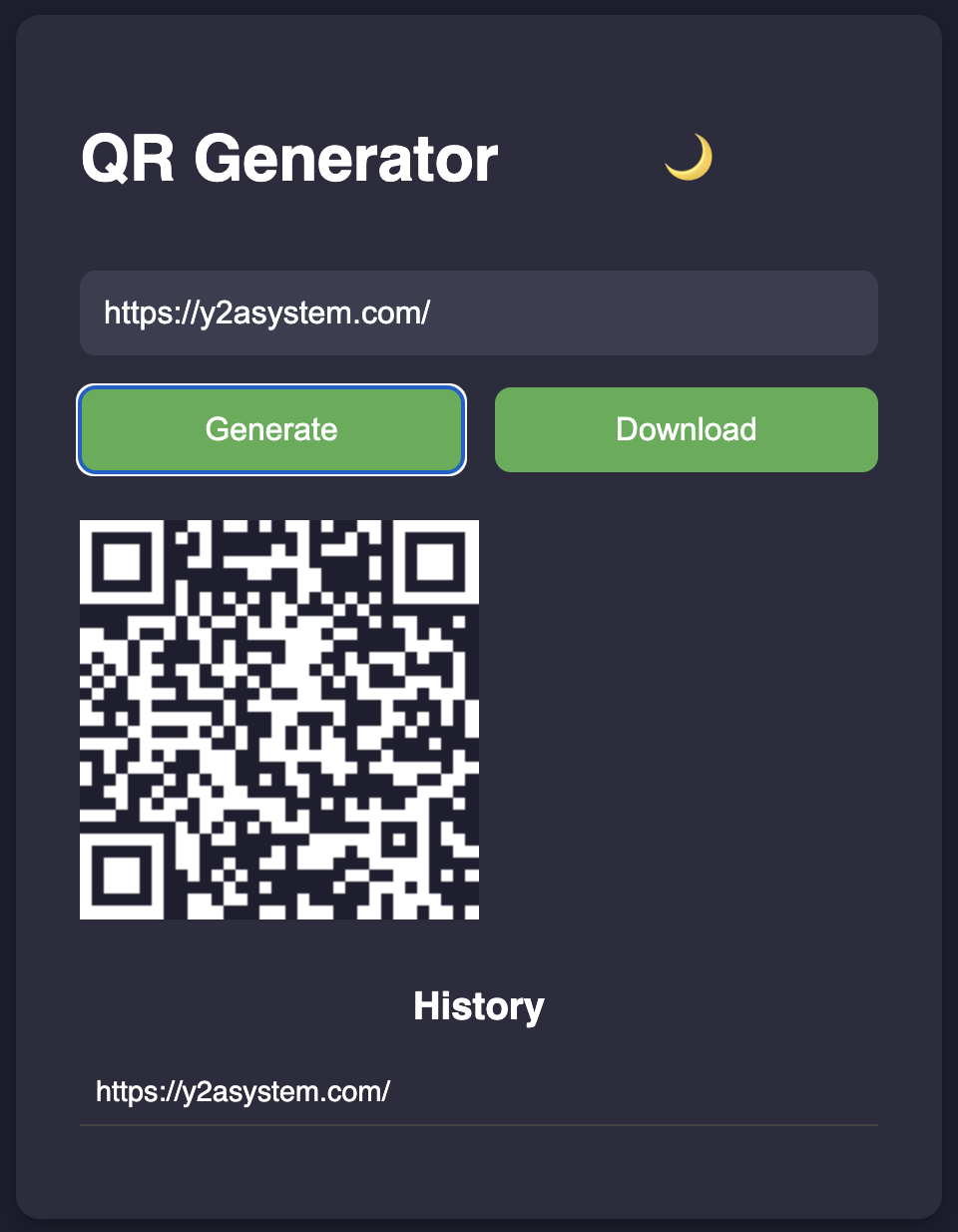
This QR Code Generator is a perfect example of how powerful even basic web technologies can be when combined thoughtfully. With just a few lines of code, we created a tool that's useful, user-friendly, and looks great on any device.
Have feedback or improvements? Feel free to fork it, tweak it, and make it your own!
Learn how to build a browser-based OCR app using Tesseract.js. Extract text from images directly in the browser with a simple client-side setup.
Step-by-step guide to creating a PHP backend that removes image backgrounds using Remove.bg API. Ideal for developers building automated image tools
Learn how to create a real-time PHP chat app using MySQL and JavaScript with user login, typing status, chat history deletion, and a modern, responsive UI.







