
How to Build a Browser OCR Tool with Tesseract.js
Learn how to build a browser-based OCR app using Tesseract.js. Extract text from images directly in the browser with a simple client-side setup.


Suggested:

Build an advanced PHP calculator with support for basic and scientific operations. Includes memory functions, trigonometric and logarithmic calculations. Learn PHP, HTML, and CSS with this hands-on project.
Table of contents [Show]
Calculators are one of the best beginner-to-intermediate level projects to sharpen your skills in any programming language. While basic calculators are often used to demonstrate syntax and control structures, building an advanced PHP calculator introduces you to real-world logic, user interface design, and dynamic input handling.
In this post, we’ll walk you through building an advanced calculator using PHP and HTML. This calculator will support:
Let’s dive into the code and see how you can create this in under 100 lines!
index.php (Single Working File)
<?php
session_start();

function evaluate_expression($expr) {
    $expr = str_replace('^', '**', $expr);
    $expr = preg_replace('/(sin|cos|tan|log|sqrt)/', 'math_$1', $expr);

    $functions = [
        'math_sin' => 'sin',
        'math_cos' => 'cos',
        'math_tan' => 'tan',
        'math_log' => 'log',
        'math_sqrt' => 'sqrt'
    ];

    foreach ($functions as $key => $phpFunc) {
        $expr = str_replace($key, $phpFunc, $expr);
    }

    try {
        $result = eval("return $expr;");
        return $result;
    } catch (Throwable $e) {
        return "Error";
    }
}

$expr = '';
$result = '';

if ($_SERVER["REQUEST_METHOD"] == "POST") {
    $input = $_POST['btn'] ?? '';
    $expr = $_POST['expression'] ?? '';

    if ($input === 'C') {
        $expr = '';
        $result = '';
    } elseif ($input === '=') {
        $result = evaluate_expression($expr);
    } else {
        $expr .= $input;
    }
}
?>

<!DOCTYPE html>
<html>
<head>
    <title>Advanced PHP Calculator</title>
    <style>
        body { font-family: Arial; background: #f4f4f4; display: flex; justify-content: center; padding-top: 50px; }
        .calculator { background: white; padding: 20px; border-radius: 10px; box-shadow: 0 0 10px gray; width: 320px; }
        input[type="text"] { width: 100%; font-size: 1.5em; margin-bottom: 10px; text-align: right; }
        .buttons input { width: 70px; height: 50px; font-size: 1.2em; margin: 5px; }
    </style>
</head>
<body>
    <div class="calculator">
        <form method="post">
            <input type="text" name="expression" value="<?= htmlspecialchars($expr) ?>">
            <div class="buttons">
                <?php
                $buttons = ['7','8','9','/','sin',
                            '4','5','6','*','cos',
                            '1','2','3','-','tan',
                            '0','.','=','+','sqrt',
                            'log','^','(',')','C'];
                foreach ($buttons as $btn) {
                    echo "<input type='submit' name='btn' value='$btn'>";
                }
                ?>
            </div>
        </form>
        <p><strong>Result:</strong> <?= $result ?></p>
    </div>
</body>
</html>
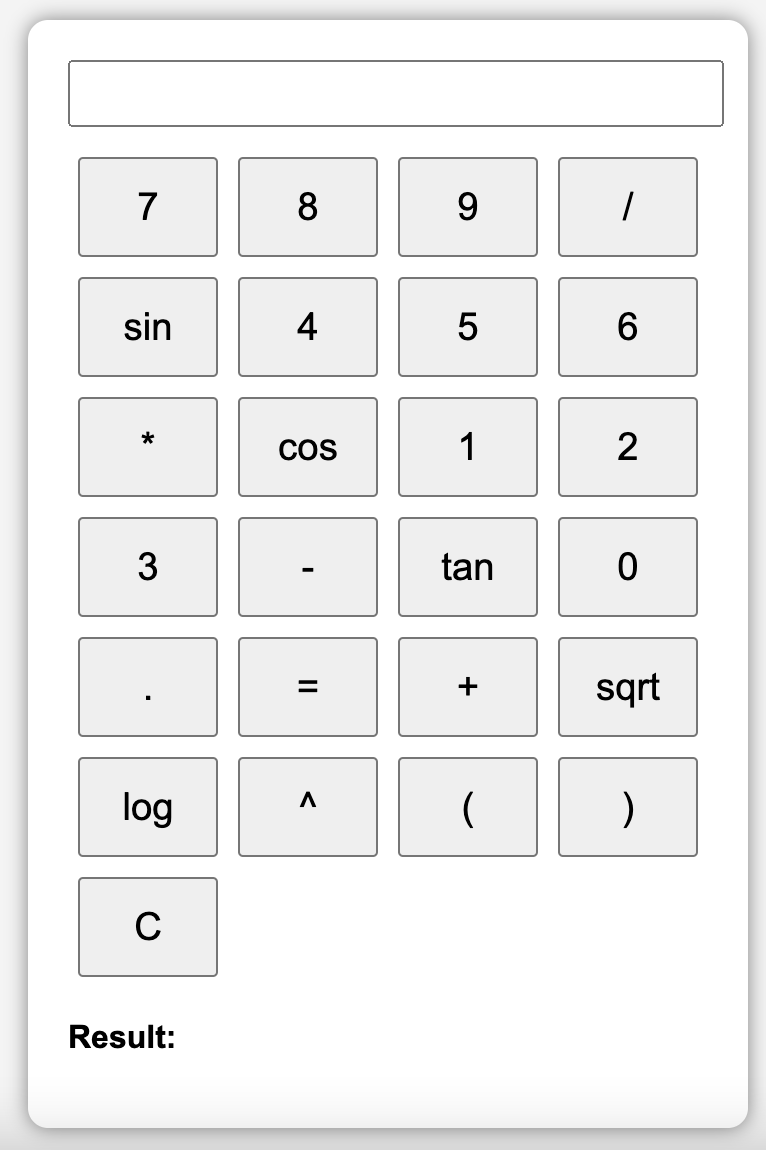
eval() after converting it into PHP-compatible syntax.sin, cos, log etc. are mapped to their PHP math_* equivalents.The current version uses eval() for expression evaluation, which is not secure for user-generated input in production environments. To mitigate this risk, consider using:
math-parser)Here are some ideas for improving this calculator:
Building an advanced PHP calculator not only reinforces core PHP concepts but also teaches practical application design. By supporting both simple and scientific operations, this project serves as a perfect gateway to more complex web tools.
Have questions or want to customize it further? Drop them in the comments!
Learn how to build a browser-based OCR app using Tesseract.js. Extract text from images directly in the browser with a simple client-side setup.
Step-by-step guide to creating a PHP backend that removes image backgrounds using Remove.bg API. Ideal for developers building automated image tools
Learn how to create a real-time PHP chat app using MySQL and JavaScript with user login, typing status, chat history deletion, and a modern, responsive UI.







