
How to Build a Browser OCR Tool with Tesseract.js
Learn how to build a browser-based OCR app using Tesseract.js. Extract text from images directly in the browser with a simple client-side setup.


Suggested:
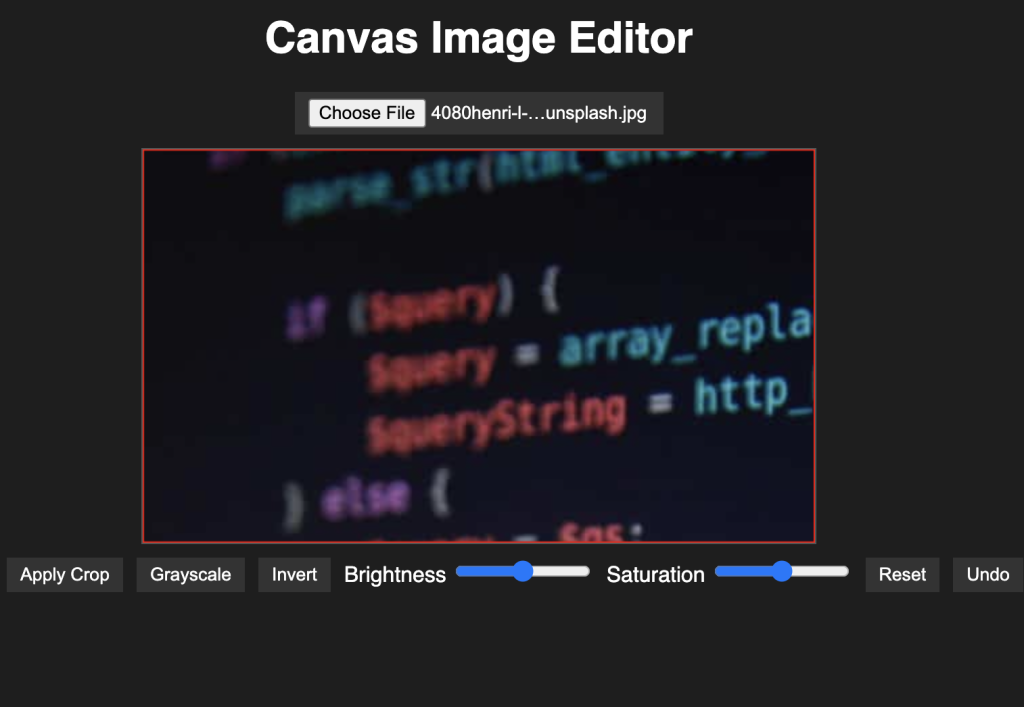
Learn how to build a powerful canvas-based image editor using HTML5, CSS, and JavaScript. Includes upload, crop, rotate, filters, brightness/saturation controls, undo/redo, and image export.
Image editing is a powerful feature to include in web applications, and with the HTML5 Canvas API and a bit of JavaScript, we can create a simple yet robust image editor. In this blog post, we'll walk through building a fully functional canvas-based image editor that allows users to upload images, crop them, apply filters, adjust brightness and saturation, and even use undo/redo functionality.
Table of contents [Show]
Our image editor includes:
<canvas>We begin with a simple structure: a canvas, an upload button, and controls for editing.
<input type="file" id="upload" accept="image/*">
<canvas id="canvas"></canvas>
<div class="controls">
  <button onclick="rotateImage()">Rotate</button>
  <!-- Additional controls here -->
</div>Using the FileReader API, we load an image from the user's device and draw it to the canvas.
upload.addEventListener('change', (e) => {
  const file = e.target.files[0];
  const reader = new FileReader();
  reader.onload = () => {
    const img = new Image();
    img.onload = () => {
      canvas.width = img.width;
      canvas.height = img.height;
      ctx.drawImage(img, 0, 0);
    };
    img.src = reader.result;
  };
  reader.readAsDataURL(file);
});Users can click and drag to select a rectangular area. Once selected, pressing the "Crop" button extracts the region and redraws it.
function applyCrop() {
  const { x, y, w, h } = getCropArea();
  const cropped = ctx.getImageData(x, y, w, h);
  canvas.width = w;
  canvas.height = h;
  ctx.putImageData(cropped, 0, 0);
}We manipulate pixel data directly for filters like grayscale and invert. Brightness and saturation are applied by altering RGB channels accordingly.
function applyFilter(type) {
  const imageData = ctx.getImageData(0, 0, canvas.width, canvas.height);
  // Loop through and modify pixel data...
  ctx.putImageData(imageData, 0, 0);
}We use a stack-based approach to allow undoing and redoing edits.
function saveState() {
  undoStack.push(ctx.getImageData(0, 0, canvas.width, canvas.height));
}Finally, users can save their edited image as a PNG file.
function exportImage() {
  const link = document.createElement('a');
  link.download = 'edited-image.png';
  link.href = canvas.toDataURL();
  link.click();
}This project showcases how powerful the Canvas API is for building image manipulation tools directly in the browser. With some creativity, you can expand this basic editor into a full-fledged image editing suite.
👉 Download Source Code 📥
Learn how to build a browser-based OCR app using Tesseract.js. Extract text from images directly in the browser with a simple client-side setup.
Step-by-step guide to creating a PHP backend that removes image backgrounds using Remove.bg API. Ideal for developers building automated image tools
Learn how to create a real-time PHP chat app using MySQL and JavaScript with user login, typing status, chat history deletion, and a modern, responsive UI.







